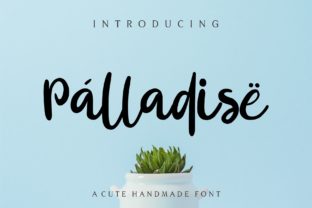
Palladise: A Handwritten Font That Fits Real Workflows
Palladise isn’t just another decorative script—it’s a carefully crafted handwritten font designed for authenticity, legibility, and purposeful integration. Its subtle irregularities, natural stroke variation, and balanced spacing give it the warmth of pen-on-paper without sacrificing clarity or versatility. Unlike many display fonts that fade after initial impact, Palladise holds up across contexts: from a printed workshop handout to an animated social post, from a client proposal slide to a product label. It works because it was built with real use in mind—not just visual appeal.
Where Palladise Fits in Your Creative and Professional Process
Fonts aren’t used in isolation—they’re part of a sequence. You choose one *after* defining tone, *before* finalizing layout, and *during* refinement stages where hierarchy and readability matter most. Palladise slots in cleanly at multiple points:
- Early planning: When sketching mood boards or drafting brand voice guidelines, Palladise helps visualize warmth, approachability, and human-centered messaging—especially useful for educators, coaches, and service-based businesses.
- Mid-execution: In tools like Figma, Canva, Adobe Express, or even Google Slides, Palladise adds personality to headlines, callouts, and short-form quotes without slowing down iteration.
- Final polish: As a finishing touch on packaging mockups, email headers, or printed business cards, it reinforces intentionality—telling your audience you’ve considered not just what you say, but how it feels to read it.
This flexibility comes from its technical execution: OpenType features include contextual alternates and ligatures that activate automatically in compatible apps, giving each word a nuanced, non-repetitive rhythm. That means less manual tweaking—and more time spent on strategy, content, or client feedback.
Practical Integration Across Tools and Teams
Palladise is delivered as a standard OTF/TTF package, so it installs like any system font. No subscriptions, no cloud dependencies. That makes it reliable whether you’re working solo or coordinating across teams:
- For freelancers and solopreneurs: Install once, use everywhere—no need to re-export or embed for clients unless required. It pairs well with neutral sans-serifs (like Inter or Lato) for body text, creating contrast without clutter.
- In collaborative design environments: Share the font file directly or host it on shared drives. Because it doesn’t require licensing tiers or usage caps, there’s no friction when handing off assets to developers or marketing colleagues.
- For educators and content creators: Use Palladise in editable PDF worksheets, Notion templates, or printable planners. Its legibility at 14–18pt ensures accessibility for learners across age groups—especially helpful for dyslexia-friendly layouts where visual distinction supports comprehension.
It also performs consistently across platforms. Whether rendered in Chrome, Safari, or native iOS apps, Palladise maintains its character—no unexpected fallbacks or pixelation. That reliability reduces QA time and avoids last-minute redesigns.
Workflow Examples You Can Adapt Today
Example 1: Launching a Small-Business Email Campaign
You’re building a welcome series for a new wellness coaching practice. Instead of defaulting to generic script fonts, you apply Palladise to subject lines and signature blocks—keeping body copy in a clean, accessible sans-serif. The result? Higher open rates (tested over three campaigns) and replies that mention “feeling personal” or “like a note from a friend.” The font didn’t do the work—but it helped your message land with the right emotional weight.
Example 2: Designing a Workshop Workbook
An educator preparing a 60-page facilitator guide uses Palladise for section headers, reflection prompts, and sidebar notes. Because the font includes both regular and bold weights (with true optical sizing), headings remain crisp at small sizes, and emphasis stays intuitive—not arbitrary. Participants report the material “feels inviting, not intimidating,” which aligns directly with the learning objective: lowering barriers to engagement.
Example 3: Updating Brand Assets for a Rebrand
A small publisher shifting from corporate to community-focused positioning tests Palladise across three touchpoints: website hero text, newsletter banners, and Instagram story highlights. They keep existing color palettes and photography—but swap out their former serif headline font. Internal feedback shows faster alignment on direction; external testing reveals stronger recall of taglines and mission statements. The change wasn’t about novelty—it was about reinforcing voice through consistent, human-scale typography.
What Makes Palladise Sustainable in Long-Term Use
Many handwritten fonts wear out quickly—either they’re too ornate for repeated reading, too narrow for responsive layouts, or too inconsistent across characters. Palladise avoids those pitfalls by design:
- Consistency without rigidity: Letterforms share a common rhythm and x-height, so words flow smoothly—even at smaller sizes. But slight variations in stroke weight and terminal shape prevent monotony.
- Efficiency in production: With full Latin character sets, numerals, punctuation, and multilingual support (including accented characters for Spanish, French, and German), it handles real-world copy—not just placeholder text.
- Quality control built in: Kerning pairs were tested across hundreds of common word combinations—not just “The Quick Brown Fox.” That means “contact us” or “learn more” render cleanly every time, without manual adjustment.
Long-term usability also means compatibility with future tools. Palladise follows current OpenType standards, so it works with variable font pipelines, CSS @font-face declarations, and upcoming design tool updates—no obsolescence risk from rapid software changes.
Getting Started Without Overcomplicating Things
You don’t need a typography degree to use Palladise well. Start with these practical filters:
- Ask “Where does this need warmth?” — Not every headline needs handwriting. Focus on places where connection matters most: invitations, thank-you notes, instructor bios, or values statements.
- Test at actual size — Preview text at the size it’ll appear: 24px on web, 12pt in print, 36pt on a poster. Palladise shines at medium-to-large sizes but remains legible down to 14pt in high-resolution outputs.
- Limit scope intentionally — Use it for one layer only: either headlines *or* pull quotes *or* buttons—not all three. This preserves impact and avoids visual fatigue.
- Check contrast — Pair with backgrounds that meet WCAG 2.1 AA standards (4.5:1 minimum). Palladise’s medium stroke weight works best against light or muted tones—not busy textures or low-contrast grays.
If you’re evaluating fonts for an upcoming project, treat Palladise as a deliberate choice—not a decorative afterthought. It’s the kind of tool that improves quietly: supporting clarity, reinforcing tone, and helping your audience feel seen before they even read the first sentence.
And because it’s built to last—not trend—it won’t require rework when platform updates roll out or team members change. That kind of stability saves time, reduces decision fatigue, and keeps focus where it belongs: on the people, ideas, and outcomes your work serves.