Empathy: The Elegant Script Font That Fits Real Design Workflows
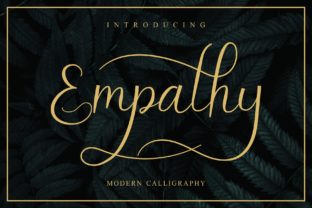
Empathy is a beautiful script font—handwritten in feel, refined in execution. It’s not just decorative; it’s functional. Designed with natural stroke variation, subtle ligatures, and balanced spacing, Empathy bridges the gap between authenticity and polish. Whether you’re finalizing a wedding invitation suite, refining a brand’s visual voice, or building social media assets for a small business launch, this font delivers elegance without sacrificing clarity or versatility.
Where Empathy Fits in Your Creative Process
Fonts aren’t chosen in isolation—they’re selected as part of a sequence: research, mood boarding, layout drafting, feedback, revision, and delivery. Empathy enters most naturally during the *refinement phase*, after core messaging and structure are locked in. That’s when tone becomes tangible—and where a script font like Empathy adds nuance without undermining readability.
For example, a freelance designer working on a boutique skincare brand might start with clean sans-serifs for body copy and product labels. Only once hierarchy and contrast are established does Empathy come in—used sparingly for taglines, monogrammed packaging accents, or email header text. This timing ensures it enhances rather than distracts.
Using Empathy Before, During, and After Key Projects
Before: When planning a branding package or print campaign, test Empathy alongside your primary typeface early—not to commit, but to assess tonal alignment. Does it soften a rigid geometric logo? Does it elevate handwritten elements in a stationery mockup? A quick side-by-side comparison in Figma or Adobe Illustrator helps avoid late-stage surprises.
During: In collaborative workflows—say, a marketing team building a seasonal campaign—Empathy works best when usage rules are documented. For instance: “Empathy is reserved for headlines over 24pt, never for body text or mobile buttons.” Clear guidelines prevent inconsistent application across Canva templates, Google Slides decks, or Shopify banners.
After: Once a project ships, revisit Empathy’s performance. Did it improve perceived warmth in customer feedback? Did users associate it with trust or luxury? Track these qualitative cues—not just downloads or click-throughs—to inform future font choices. Empathy isn’t static; its impact evolves with context and audience.
Layering Empathy for Depth and Dimension
The real strength of Empathy lies in how it responds to layering. Unlike rigid display fonts, it gains expressive range when combined with color, opacity, and background texture. Try overlaying two instances of the same word—one at full opacity in deep charcoal, another at 30% in blush pink—slightly offset. Or place Empathy over a linen-textured background and reduce turbidity just enough to suggest softness, not blur.
This isn’t about decoration for decoration’s sake. It’s about creating tactile resonance. A wedding planner using Empathy for save-the-date cards might layer it over watercolor washes to echo hand-painted stationery. A podcast host designing Instagram quote graphics could pair Empathy with a muted gradient to guide the eye without competing with the message.
Compatibility and Practical Integration
Empathy supports OpenType features including stylistic alternates and contextual ligatures—useful for avoiding awkward letter collisions (like “Th” or “Fl”). Enable these in Adobe apps via the Glyphs panel or Character panel’s flyout menu. In Figma, install the font properly and use the “Typography” plugin to preview alternates before exporting.
It pairs cleanly with neutral sans-serifs (e.g., Inter, Poppins, or Montserrat) and structured serifs (e.g., Merriweather or Lora). Avoid pairing it with other scripts—especially high-contrast ones—as that dilutes its distinctiveness. If your workflow includes variable fonts or webfont loading, note that Empathy is currently available as a static OTF/TTF. For web use, convert and serve it via @font-face with appropriate fallbacks and font-display: swap to maintain performance.
Workflow Examples Across Roles
- Small business owners: Use Empathy in Canva templates for limited-edition product labels—then export as SVG to preserve crisp edges at any size. Save color variants (gold foil, matte black, cream-on-kraft) as separate layers for fast seasonal swaps.
- Educators and course creators: Apply Empathy to certificate headers or module titles in Notion or Teachable. Keep body text in a highly legible font like Roboto—this maintains accessibility while letting Empathy signal achievement and care.
- Freelance marketers: Embed Empathy in branded pitch decks—but only for client-facing slides, not internal strategy docs. Consistency here builds recognition; restraint preserves impact.
- Hobbyists and crafters: Print Empathy-based quotes on textured cardstock using a home inkjet. Adjust printer settings to “matte paper” and increase saturation slightly—the font’s organic flow absorbs minor ink spread better than sharp geometric fonts.
Long-Term Use: Consistency Without Rigidity
Using Empathy regularly doesn’t mean using it everywhere. Think of it like a signature ingredient—valuable because it’s intentional, not because it’s omnipresent. Audit your assets quarterly: How many touchpoints actually benefit from its warmth? Where does it risk feeling repetitive or overly ornamental?
Also consider licensing. Empathy is licensed for both personal and commercial use—but verify permissions for specific platforms. For example, some social media design tools restrict custom font uploads unless you’re on a paid plan. Test upload limits early, especially if you manage multiple client accounts.
Finally, organize your Empathy files thoughtfully. Keep OTF, TTF, and webfont versions in clearly labeled folders. Add a README.txt noting version number, license scope, and common pairings. This saves time when onboarding collaborators or revisiting old projects months later.
Quality Control and Realistic Expectations
Empathy excels at evoking sincerity—but it won’t compensate for weak composition or unclear messaging. Its effectiveness depends on deliberate placement, not automatic charm. Always ask: Does this use serve the user’s need—or just look pretty?
Test legibility rigorously. At 16px on screen, Empathy begins to lose definition. Reserve it for larger applications: headlines above 28pt, printed invitations at 14pt+, or social posts where text occupies at least 20% of the canvas. Run color contrast checks (using WebAIM’s Contrast Checker) when layering over photos or gradients—especially for accessibility compliance.
And remember: empathy—the human quality—is what guides these decisions. Choosing Empathy isn’t just aesthetic. It’s a signal that you’ve considered how your audience will experience the work—not just see it, but feel it.