Degres: A Modern Sans Serif for Confident, International Branding
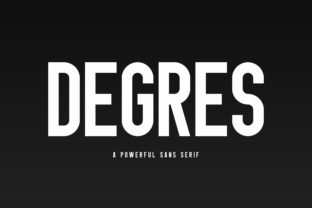
Degres is a modern and bold sans serif font designed for clarity, presence, and cross-linguistic reliability. It doesn’t shout — it states. Its clean geometry, balanced weight distribution, and generous x-height make it highly legible at small sizes and commanding at large ones. Unlike fonts that rely on stylistic quirks or narrow stylistic niches, Degres delivers consistent visual authority across contexts — from a product label scanned in under two seconds to a book cover held in hand for minutes.
For professionals who manage brand assets, produce marketing materials, or oversee design systems, Degres fits into the workflow not as an afterthought, but as a strategic layer. It’s selected early — often during brand architecture or style guide development — because its characteristics directly support long-term consistency and scalability. Once chosen, it becomes part of the foundational toolkit: paired with a neutral body font (like Inter, Lato, or Roboto), tested across platforms, and embedded in design templates, CMS presets, and print specifications.
Where Degres Fits in Real Projects
In branding projects, Degres typically enters during the identity refinement phase — after core values and audience insights are documented, but before final lockup or color palette finalization. Its strength lies in how it translates intention into visual tone: if your brand voice is direct, capable, and globally aware, Degres reinforces that without needing embellishment. Designers test it against real content — not just “Lorem ipsum” — using actual headlines, taglines, and multilingual snippets (e.g., English + Spanish + Vietnamese) to verify spacing, diacritic rendering, and optical balance.
For packaging designers, Degres works *before* production begins: its robust character set supports international SKUs, regulatory text requirements, and localized ingredient lists. Because it includes extended Latin, Cyrillic, and Greek coverage, teams avoid last-minute font swaps or inconsistent fallbacks when expanding into new markets. That means fewer revision rounds, cleaner prepress files, and faster time-to-shelf — especially critical for small-batch producers or DTC brands managing their own print vendors.
During editorial workflows — whether for indie publishing, educational courseware, or blog design — Degres functions best as a structural anchor. Use it for chapter titles, section headers, pull quotes, and cover typography. Its even stroke contrast ensures readability on both high-DPI screens and matte-finish paper. Importantly, it pairs predictably: a medium weight for subheads, bold for main titles, and light for subtle accent text — all within the same family, eliminating licensing complexity or rendering inconsistencies across devices.
Integration Across Tools and Teams
Degres integrates cleanly into common creative and production environments. In Figma or Adobe XD, it’s applied via variable font axes (weight, width), allowing rapid iteration without loading multiple static files. In web projects, it’s served efficiently through modern @font-face declarations or via trusted font hosts that support subsetting — crucial for maintaining page speed while retaining language support. For print teams, OpenType features like discretionary ligatures and localized numeral forms are accessible in InDesign and Affinity Publisher, enabling precise typographic control without manual overrides.
Collaboration improves when Degres is treated as a shared asset — not just a designer’s preference. Marketing teams use it in Canva templates; developers reference its CSS font stack in component libraries; writers preview headline treatments in CMS staging environments. This alignment reduces miscommunication: when a social media manager sees the same Degres weight and tracking used in the brand guidelines, they apply it consistently across Instagram carousels, email banners, and landing pages — no back-and-forth about “which bold version.”
Practical Implementation Tips
- Start with hierarchy, not decoration: Define exactly where Degres will appear (e.g., H1 only, product names + CTAs) and stick to 2–3 weights max. Overusing bold or condensed variants dilutes impact.
- Test language coverage early: If your audience includes French, Turkish, or Polish speakers, verify that accented characters (ç, ş, ń) render correctly in your target environment — especially in email clients or legacy PDF viewers.
- Pair intentionally: Degres shines alongside humanist sans serifs or low-contrast serifs (e.g., Source Sans Pro, Crimson Text). Avoid pairing it with other geometric sans fonts (like Futura or Montserrat) — the similarity creates visual redundancy, not harmony.
- Optimize for performance: On websites, serve Degres as WOFF2 with unicode-range subsetting. Exclude unused scripts (e.g., Greek) if your site serves only Western European languages — this cuts file size by up to 40% without compromising quality.
- Document usage rules: Include clear examples in your brand guide: minimum readable size (16px for UI, 24pt for print), letter-spacing recommendations (+10–20 units for all-caps usage), and prohibited combinations (e.g., Degres Light + light gray text on white background).
Maintaining Quality and Consistency Over Time
Long-term use of Degres depends less on novelty and more on discipline. Small business owners and solo creators benefit most when they treat font usage like any other systemized asset: version-controlled, documented, and reviewed quarterly. For example, revisiting Degres settings every six months helps catch issues like outdated web font links, broken Figma library syncs, or inconsistent application in newer tools (e.g., Notion page headers or Airtable interface customizations).
Quality control starts with verification — not assumption. Before launching a campaign or printing 500 units, check Degres in context: zoom out to see how it holds up at thumbnail size; view it on mobile Safari and Android Chrome; print a physical proof. These checks catch subtle issues — like uneven baseline alignment in stacked bilingual labels or slight kerning gaps in uppercase acronyms — that only surface under real conditions.
Efficiency gains compound over time. Once Degres is embedded in your primary tools — your Figma UI kit, WordPress theme CSS, Canva brand kit, and InDesign paragraph styles — applying it becomes automatic. That frees mental bandwidth for higher-level decisions: messaging strategy, audience segmentation, or layout rhythm — not font selection fatigue.
Who Benefits Most — and How
Entrepreneurs building MVP landing pages use Degres to project competence fast — its boldness signals readiness without requiring complex visuals. Educators designing course slides apply it to section headers so learners instantly grasp structure, even when scanning on tablets. Bloggers embed it in quote graphics to increase shareability — its clarity survives compression and cropping. Freelancers include Degres in proposal decks to visually reinforce professionalism before the first line of copy is read.
What ties these uses together isn’t aesthetics alone — it’s how Degres supports decision-making velocity. When you know a font reliably performs across languages, devices, and mediums, you spend less time troubleshooting and more time shipping. That’s not just convenience — it’s leverage. Leverage to iterate faster, scale confidently, and maintain brand integrity without constant oversight.
Degres doesn’t replace strategy or content. It enables them — quietly, consistently, and globally.