Lucy Carter Script: Where Handwritten Charm Meets Modern Design Versatility
There’s a quiet magic in fonts that feel like they were written by hand—not traced, not digitized to perfection, but alive with rhythm, breath, and gentle imperfection. Lucy Carter Script belongs to that rare category of typefaces that doesn’t just sit on the page—it invites you in. Light, elegant, and brimming with authenticity, it’s more than a decorative script; it’s a design ally for creators who value warmth, intentionality, and visual storytelling.
What Makes Lucy Carter Script Feel So Genuine?
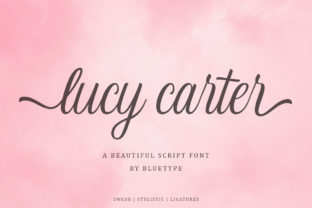
Unlike many script fonts that rely on exaggerated flourishes or rigid symmetry, Lucy Carter Script embraces subtlety. Its letterforms flow with natural variation—slight shifts in stroke weight, delicate entry and exit strokes, and soft, organic terminals. The lowercase “a” has a graceful open bowl; the “g” curls with quiet confidence; the “t” features a tender crossbar that feels handwritten, not algorithmic. These aren’t quirks—they’re carefully considered human signatures baked into the font’s DNA.
This authenticity isn’t accidental. It stems from thoughtful design decisions: consistent x-height, balanced spacing (both letter and word), and a rhythm that mimics real pen movement—even at small sizes. That means Lucy Carter Script remains legible in body text applications like wedding invitations or boutique product tags, not just oversized headlines.
Where Lucy Carter Script Shines in Real-World Projects
Designers reach for Lucy Carter Script when they need elegance without formality—and charm without cliché. Here’s where it consistently delivers:
- Wedding Stationery: From save-the-dates to menu cards, Lucy Carter Script adds intimacy without looking overly romantic or fussy. Pair it with a clean sans-serif like Montserrat or Lato for contrast that feels intentional—not jarring.
- Brand Identity for Small Businesses: Artisanal bakeries, independent bookshops, handmade jewelry lines—they all benefit from a font that communicates care and craftsmanship. Using Lucy Carter Script in a logo or packaging subtly signals that the brand values detail and human connection.
- Digital Content & Social Graphics: On Instagram or Pinterest, where visual tone sets expectations before a single word is read, Lucy Carter Script helps lifestyle bloggers, wellness coaches, and creative educators stand out. A quote overlay on a muted background? A subtle watermark on a printable planner? This font elevates without shouting.
- Print-on-Demand & Craft Projects: Whether you're designing greeting cards, wall art, or custom notebooks, Lucy Carter Script scales beautifully across paper textures and print methods—from letterpress to inkjet. Its light weight prevents ink bleed on thinner stocks, while its clarity holds up even in smaller point sizes (14–18pt works surprisingly well for short phrases).
How It Fits Into Today’s Creative Workflows
Modern designers don’t have time for fonts that break layouts or demand excessive manual tweaking. Lucy Carter Script was built with practicality in mind. It includes standard OpenType features—ligatures, contextual alternates, and stylistic sets—that activate automatically in compatible software (like Adobe Illustrator, Affinity Designer, or modern versions of Canva). That means your “fi” and “fl” combinations connect naturally, and repeated words gain gentle variation—no copy-pasting alternate glyphs required.
It also supports Latin-based languages extensively—including accented characters for French, Spanish, Portuguese, and Scandinavian languages—making it viable for global small businesses or multilingual editorial projects. And because it’s available in both desktop and webfont formats, you can use it seamlessly across platforms: a branded email header in Mailchimp, a Shopify product title, or an animated headline in After Effects (via compatible plugins).
Pairing Lucy Carter Script Thoughtfully
A common hesitation with elegant scripts is overuse—or mismatched pairings. Lucy Carter Script thrives when given breathing room and contrast. Think of it as the voice in your design, not the entire conversation.
Here’s what works best:
- Contrast in weight and structure: Pair with a neutral, geometric sans-serif (e.g., Inter or Poppins) or a warm humanist option (like Nunito or Quicksand). Avoid other scripts or overly decorative fonts—they compete rather than complement.
- Respect hierarchy: Use Lucy Carter Script for headlines, quotes, or accent text—not long paragraphs. Let your supporting typeface handle readability at scale.
- Consider color and background: Because of its light stroke weight, avoid very light grays or busy textured backgrounds. Deep charcoal on ivory paper, navy on cream, or soft black on matte white deliver maximum impact.
Practical Considerations Before You Choose Lucy Carter Script
Like any tool, Lucy Carter Script excels in certain contexts—and knowing its sweet spots saves time and strengthens outcomes.
Licensing matters. While many free scripts cut corners on language support or character count, Lucy Carter Script is typically offered under clear, commercial-friendly licenses. Always verify whether your intended use—especially for client work or digital products—requires a desktop, web, or extended license. Reputable vendors provide transparent terms upfront.
Test early, test often. Preview how Lucy Carter Script renders on actual devices—not just in design software. Some browsers or email clients may substitute fonts if web versions aren’t properly embedded. Always export test PDFs or share live previews with stakeholders before final sign-off.
Don’t force versatility. This isn’t a “do-it-all” font. It won’t replace your system UI font or serve as body text in a 50-page report. But within its lane—elegant, expressive, human-centered communication—it performs with quiet authority.
Why Designers Keep Coming Back to Lucy Carter Script
It’s not just about aesthetics. In a landscape saturated with bold display fonts and minimalist sans-serifs, Lucy Carter Script offers something increasingly rare: emotional resonance without sentimentality. It feels personal, but never private. Refined, but never cold.
You’ll see it in the handwritten note tucked inside a luxury candle box. In the delicate serif-and-script combo on a ceramic studio’s business card. In the soft animation of a boutique hotel’s welcome video. Each time, it does the same quiet work: signaling care, signaling craft, signaling *you were thought of*.
That’s the real power of Lucy Carter Script. It doesn’t shout. It lingers.
Getting Started With Lucy Carter Script
If you’re exploring options for your next project, start simple:
- Download a trial version (if available) and test it in your actual workflow—don’t just preview in a font browser.
- Type out your most common use case: a headline, a tagline, a short quote. Does it feel right at the size and weight you need?
- Try exporting to multiple formats (PDF, PNG, web-ready SVG) to check rendering consistency.
- Ask yourself: Does this font make the message feel more *true*, not just more *pretty*?
When the answer is yes—that’s when Lucy Carter Script earns its place. Not as decoration, but as intention made visible.