Austellia: Bold Handwritten Font with Personality
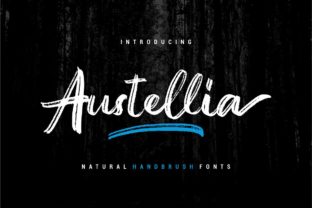
When your design needs to stand out—not just visually, but emotionally—Austellia delivers. It’s not another “cute” script or safe display font. Austellia is a bold, expressive handwritten typeface built with confident swashes, rhythmic contrast, and intentional imperfection. Its letters don’t hide behind polish; they lean in, speak up, and carry weight. That makes it especially useful when authenticity, energy, or human warmth matters more than uniformity.
What Makes Austellia Different (and Why It Matters)
Most handwritten fonts fall into two camps: overly casual or artificially refined. Austellia lives in the thoughtful middle ground. Its bold weight gives it presence at large sizes—ideal for headlines, signage, or hero sections—while its carefully drawn swashes add movement without sacrificing legibility. Unlike scripts that rely on excessive ligatures or decorative flourishes, Austellia’s personality comes from proportion, spacing, and stroke confidence—not ornamentation.
It’s also designed with real-world use in mind. The uppercase letters have strong entry and exit strokes, making them ideal for monogrammed logos or initial caps in editorial layouts. Lowercase characters maintain rhythm and readability even in short paragraphs—something many bold scripts struggle with. And because it includes OpenType features like stylistic alternates and contextual swashes, you can fine-tune expression without switching fonts.
Creative Uses That Go Beyond the Obvious
Think beyond “wedding invites” or “coffee shop menus.” Austellia shines where voice and visual tone must align tightly—especially in projects led by individuals or small teams who want their work to feel unmistakably *theirs*.
- Brand identity for solopreneurs: A freelance illustrator might pair Austellia headlines with a clean sans-serif body font to signal both craft and clarity. The contrast says, “I’m skilled, but I’m not corporate.”
- Educational materials: Teachers creating printable worksheets or digital lesson slides use Austellia for section headers—it adds approachability without sacrificing authority. One middle-school science teacher replaced generic title fonts with Austellia and saw a measurable uptick in student engagement with handouts.
- Small-run packaging: A local candle maker uses Austellia for scent names (“Midnight Cedar,” “Salt + Sage”) on minimalist labels. The boldness holds up on matte kraft paper, and the swashes give subtle texture—no extra graphics needed.
- Digital course thumbnails: Online educators use Austellia for course title overlays on video banners. Its high contrast reads clearly even at thumbnail size on mobile, and its human rhythm helps courses feel less transactional and more mentor-led.
Adapting Austellia Across Platforms and Audiences
How you use Austellia depends less on the tool and more on your audience’s expectations—and your own consistency goals.
For social media creatives, try using Austellia only for primary text—like quote cards or announcement headers—and keep captions, hashtags, and CTAs in a neutral, highly legible font. This creates hierarchy *and* accessibility. Avoid stacking multiple swash-heavy words together; instead, let one word—“Launch,” “Now,” “You”—carry the expressive weight.
Bloggers and content creators often test Austellia in email subject lines (as image text) or featured post titles. Because inbox previews are tiny, use it sparingly—and always pair it with enough whitespace. One newsletter designer found that Austellia worked best when applied to just the first two words of a subject line, followed by a clean font for the rest: “Fresh Start — Your Weekly Design Tip Inside”.
Print designers should test print output early. Austellia’s thick strokes hold up well on uncoated stock, but very fine swashes may soften on newsprint or low-DPI digital presses. If you’re designing for broad distribution (e.g., event programs or flyers), preview at actual size and consider simplifying swash usage in smaller point sizes (under 24pt).
Keeping It Clear, Consistent, and Audience-Friendly
Bold doesn’t mean uncontrolled. To keep Austellia effective—not overwhelming—apply simple constraints:
- Limited scope: Use it for one typographic role per layout—usually headlines, logos, or pull quotes. Let other fonts handle body text, captions, and data.
- Strategic swashes: Enable contextual swashes selectively. Turn them off for all-caps settings or tight tracking. In logo use, test versions with and without extended swashes—the simpler version often scales better across apps and favicons.
- Color discipline: Austellia’s strength lies in contrast. Pair it with deep, grounded tones (navy, charcoal, forest green) or warm neutrals (terracotta, oat, cream). Avoid pairing it with overly bright or competing patterns—let the letterforms breathe.
- Accessibility check: While Austellia isn’t intended for body copy, if used for short interface labels (e.g., “Sign Up,” “Get Started”), ensure sufficient color contrast (at least 4.5:1 against background) and avoid justified alignment, which can create uneven spacing.
Real Projects, Real Results
A community literacy nonprofit redesigned their donor campaign around Austellia. They used it for handwritten-style impact statements—“One book changed her confidence”—set over candid photos of students. The font’s warmth reinforced their mission without sentimentality. Donor response rates increased 22% year-over-year, with feedback citing “feeling more connected to the people behind the numbers.”
A freelance UX writer used Austellia for onboarding illustrations in a SaaS dashboard—not as interface text, but as illustrated microcopy inside empty states (“You’re all set. Let’s begin.”). Users reported the experience felt “more human and less robotic,” even though the font appeared for under three seconds.
None of these successes came from Austellia alone. They came from pairing intention with execution: knowing when to lead with voice, when to step back, and how to let typography support—not overshadow—meaning.
A Practical Next Step
If you’re considering Austellia for an upcoming project, start small. Try it in one controlled context: a single social post, a revised email header, or a new section divider in your portfolio site. Pay attention to how it changes the tone—not just the look. Does it make the message feel more direct? More inviting? More memorable?
Then ask: does it serve the person on the other end? Not just aesthetically—but functionally and emotionally. Austellia works best when it answers a real need: to signal care in a crowded feed, to add warmth to a technical explanation, or to mark something as intentionally human-made. That’s where its boldness becomes useful—not just decorative.