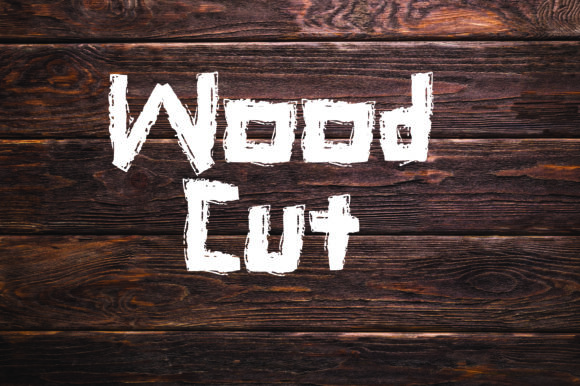
Wood Cut: A Bold, Textured Font Inspired by Timber
The smell of burning timber. The snap and crackle of logs on the fire. That unmistakable, earthy scent—rough, warm, alive. It’s more than atmosphere. It’s memory, texture, presence. Wood Cut captures that feeling in typographic form: a bold, hand-chiseled font that looks freshly split from a pine log, grain visible, edges raw and intentional.
It’s not just “wood-themed.” Wood Cut is a display font built with deliberate imperfection—slight asymmetry, uneven stroke weight, subtle grain overlays, and tactile contrast between light and dark areas. It doesn’t simulate wood digitally; it evokes the act of cutting it. That distinction matters—especially if you’re choosing type to carry meaning, not just fill space.
Why This Font Resonates Differently Across Roles
Typography isn’t neutral. How a word looks shapes how it’s felt—and who feels it most depends on what you’re trying to do, who you’re speaking to, and where the text lives. Wood Cut isn’t for body copy or spreadsheets. But in the right context? It becomes a quiet signal: grounded, authentic, human-made.
For Designers & Creatives
You notice the kerning inconsistencies—not as flaws, but as evidence of craft. You test how Wood Cut holds up at 48pt on a poster versus 120pt on a festival banner. You pair it with a clean sans-serif (like Inter or Manrope) to let its texture breathe without overwhelming. One freelance designer used it for a local distillery’s limited-edition bourbon label—paired with hand-drawn botanical line art and uncoated paper stock. The font didn’t shout; it grounded the whole story in material honesty.
For Educators & Workshop Leaders
You might use Wood Cut in slide headers for a lesson on sustainable forestry—or in printed handouts for a woodworking class. Its visual language reinforces concepts: grain direction, tool marks, natural variation. A high school art teacher printed student project titles in Wood Cut on reclaimed barnwood panels. Students didn’t just learn about texture—they *saw* it echoed in the letters themselves. No lecture needed.
For Small Business Owners & Local Makers
If your brand centers on craftsmanship—ceramics, leather goods, sourdough, handmade soap—Wood Cut communicates values before a single word is read. It signals care, patience, material respect. One candlemaker switched from a generic serif to Wood Cut for her seasonal collection names (“Hearth Smoke,” “Pine Resin,” “Ash Grey”). Sales didn’t jump overnight—but customer messages did: *“This font feels like your candles smell.”* That alignment between sensory experience and visual tone builds quiet trust.
For Bloggers & Content Creators
You know headlines need impact—but also intention. Wood Cut works best when used sparingly: a single hero headline per post, a section divider, or a pull quote graphic shared on Instagram. Overuse fatigues the eye. Used well, it adds warmth to topics often rendered cold in digital spaces—like climate resilience, rural entrepreneurship, or intergenerational skill-sharing. A sustainability blogger used it for a series titled *“What Grows Back”*, pairing each header with photos of regrown forest plots. The font didn’t distract—it deepened the theme.
For Marketers & Brand Strategists
You evaluate fonts through layers: legibility at scale, licensing clarity, technical compatibility (WOFF2, variable support), and cultural resonance. Wood Cut is a display font—so it’s not meant for email body text or mobile navigation. But for campaign banners, event signage, or branded merchandise? Its distinctiveness cuts through algorithmic noise. One regional food co-op used it across their “Rooted in Place” rebrand—on tote bags, chalkboard menus, and farmers’ market tents. Consistency wasn’t about repetition; it was about reinforcing a shared physical reality.
What to Consider Before You Use It
Wood Cut isn’t for every project—or every person. Here’s how to tell if it fits yours:
- Ease of use? Yes—if you’re comfortable installing desktop fonts or embedding via CSS. It includes OTF, WOFF2, and basic web licensing. No complex setup, but it’s not available on free font platforms like Google Fonts.
- Cost? It’s affordably priced for individuals and small teams. Larger organizations may need extended licenses for apps or broadcast—check the foundry’s terms directly.
- Flexibility? Limited—but intentionally so. It has one weight (bold), no italics, and minimal language support (Latin-based scripts only). That narrow scope is part of its strength: it says one thing, clearly.
- Quality & reliability? Well-hinted, tested across browsers and print workflows. Glyphs are carefully spaced to avoid awkward collisions—especially important given its irregular edges.
- Creativity & learning value? Excellent for teaching typography principles: contrast, rhythm, negative space, and how texture affects perception. Great for student design briefs focused on “material language.”
When Wood Cut Might Not Be the Right Fit
It won’t serve you well if you need accessibility-first typography (its decorative nature reduces readability at small sizes), require multilingual support beyond English/Spanish/French, or are building a system requiring dozens of weights and widths. It’s also not ideal for fast-turnaround social ads where speed trumps nuance—or for brands aiming for sleek, futuristic, or highly polished aesthetics.
That’s not a limitation. It’s focus.
A Practical Starting Point
Try this: open a blank document. Type three words that describe your project’s core feeling—e.g., *warm, honest, unhurried*. Now type them in Wood Cut. Step back. Does the texture support those words—or compete with them? Does it feel like an extension of your voice, or a costume?
One illustrator testing it for her children’s book manuscript realized the font’s ruggedness clashed with her soft watercolor style. She switched to a lighter, grain-adjacent alternative—and kept Wood Cut reserved for the book’s dedication page, carved into a faux-wood endpaper illustration. Context shaped the choice.
Another nonprofit used it only in their annual report’s “Stewardship” section—where stories of land restoration appeared alongside soil samples pressed into the paper. The font didn’t appear elsewhere. Its power came from restraint.
Wood Cut asks you to slow down—not because it’s difficult, but because it rewards attention. It invites you to consider where text lives, how it’s experienced, and what kind of world you’re helping readers imagine. Not every project needs that weight. But when yours does, Wood Cut doesn’t just sit on the page. It roots itself there.