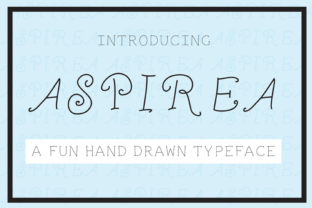
Aspira: A Hand-Drawn Font with Warmth and Versatility
Aspira is a thoughtfully crafted, hand-drawn font designed to bring personality and charm to your creative work—without sacrificing clarity or usability. Unlike many digital typefaces that feel uniform or overly polished, Aspira carries the gentle imperfections of real pen-on-paper artistry: subtle line variations, soft curves, and a natural rhythm that invites the eye to linger. It’s not just decorative—it’s expressive, adaptable, and grounded in purpose.
Why Designers and Makers Choose Aspira
People reach for Aspira when they want their words to feel intentional—not just seen, but felt. Whether you're drafting a heartfelt wedding invitation, refining your small business logo, or cutting layered paper designs for a handmade greeting card, Aspira adds warmth and distinction. Its balanced proportions make it highly legible at medium to large sizes, while its organic flow gives even simple phrases a touch of elegance.
This isn’t a font built for dense paragraphs or body text. Instead, Aspira shines where impact matters most: headlines, monograms, signage, social media graphics, and short-form messaging. That makes it especially valuable for creators who need visual consistency across multiple touchpoints—like a café owner designing a menu, a wedding planner crafting suite stationery, or an educator preparing classroom posters that feel inviting rather than clinical.
Real-Life Uses You’ll Recognize
Here’s how Aspira fits naturally into everyday creative work:
- Wedding projects: Use it for names on save-the-date cards, script-style “Mr. & Mrs.” on ceremony programs, or delicate accents on place cards. Its hand-drawn nature echoes the care behind each detail of a meaningful celebration.
- Small business branding: Pair Aspira with a clean sans-serif for contrast—say, an Aspira logo paired with Roboto for website copy. It works beautifully for boutique shops, artisan studios, yoga studios, or local bakeries wanting to signal authenticity and approachability.
- Paper crafts and DIY design: Cut Aspira lettering from vinyl or cardstock using machines like Cricut or Silhouette. Its open shapes and consistent stroke weight translate well to physical materials—no thin, fragile lines that break during weeding or layering.
- Digital content: Create Instagram story headers, Pinterest pins, or email newsletter banners. Because it’s vector-based (available in OTF and TTF formats), it scales cleanly at any size without pixelation.
What Makes Aspira Stand Out—Without Overpromising
Many hand-drawn fonts sacrifice readability for flair—or go so far in the other direction that they lose character entirely. Aspira avoids both extremes. Its letters are spaced generously, with clear distinctions between similar characters (like lowercase l, i, and 1). Uppercase forms have graceful terminals; lowercase has friendly, rounded ascenders and descenders. There’s no forced quirkiness—just quiet confidence in its own style.
It’s also intentionally versatile in tone. Used boldly in all caps, Aspira feels celebratory and confident. Set lightly in sentence case with generous leading, it becomes tender and personal. That flexibility means you don’t need five different fonts to cover your project needs—you can rely on thoughtful styling choices instead.
Things to Keep in Mind Before You Use Aspira
Like any tool, Aspira works best when matched to the right job. Here are practical considerations:
- It’s display-focused. Avoid using it for long paragraphs, legal disclaimers, or data tables. Stick to titles, quotes, labels, and short callouts.
- Check licensing early. Aspira is typically offered with personal and commercial licenses. If you’re designing for a client—or selling products featuring the font—make sure your license covers those uses. Some versions include webfont support; others don’t.
- Pair it wisely. Aspira sings alongside neutral, well-proportioned sans-serifs (like Inter, Lato, or Montserrat) or understated serifs (like Merriweather or Playfair Display). Avoid pairing it with other hand-drawn or heavily textured fonts—that can create visual noise.
- Test print and screen rendering. While Aspira renders cleanly on most devices, preview how it looks at actual size on your target output—especially if printing on textured paper or displaying on lower-resolution screens.
- Consider accessibility. Its decorative nature means it shouldn’t be used for primary navigation or critical interface text. Reserve it for expressive, non-essential elements where personality enhances meaning.
Getting Started Is Simple—No Design Degree Required
You don’t need advanced software or typography training to use Aspira well. Most users begin with tools they already know: Canva, Adobe Express, Affinity Designer, or even PowerPoint. Install the font file once, then select it like any other typeface. Start small—swap out a heading in your next social post or redesign one section of your website banner. Notice how much more grounded and human it feels.
Beginners often find success by limiting themselves to two weights (regular and bold) and one color—black or deep charcoal on light backgrounds, or cream on navy. That restraint lets Aspira’s character speak clearly, without competing elements.
For educators and hobbyists, Aspira also works wonderfully in printable resources: lesson headers, craft templates, or seasonal decorations. Because it’s easy to read and visually soothing, it supports learning environments without overwhelming students or participants.
A Font That Grows With Your Projects
What makes Aspira especially useful over time is how consistently it adapts. Launch a new brand? Aspira helps establish voice before you’ve finalized every visual detail. Plan a milestone event? It adds cohesion across digital RSVPs, printed menus, and thank-you notes. Start a blog or Etsy shop? It gives your banner, product tags, and packaging a signature look—without needing custom illustration.
It’s not flashy—but it’s memorable. Not trendy—but quietly current. And because it was drawn by hand with care, it carries something hard to replicate digitally: sincerity. That’s why so many creators return to Aspira again and again—not as a one-off novelty, but as a reliable part of their visual toolkit.