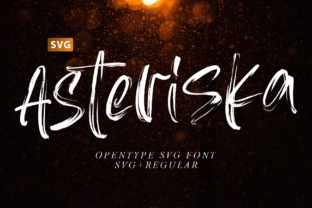
Asteriska
Asteriska isn’t just another display font—it’s a visual statement with weight, texture, and intention. Designed to feel grounded yet expressive, it brings realism and character to headlines, logos, posters, packaging, and digital banners. Its bold forms carry presence without shouting; its subtle irregularities suggest handcrafted authenticity, not digital sterility. That’s why designers, small business owners, educators crafting classroom materials, and bloggers building brand identity are turning to Asteriska when they need typography that communicates confidence *and* humanity.
It’s a color font—so compatibility isn’t automatic
One of the most common oversights? Assuming Asteriska works everywhere like standard fonts. It’s an OpenType-SVG color font—a format that embeds layered colors, gradients, and vector textures directly into each glyph. That’s what gives Asteriska its rich, dimensional look. But this strength comes with boundaries: it runs smoothly in Photoshop (CC 2017+), Illustrator (CC 2018+), Silhouette Studio (v5.0+), and Inkscape (1.1+). It does not work in Cricut Design Space—not even with OTF or TTF versions included in the package. Those files are fallbacks for basic monochrome use only and lack the color data entirely.
Why does this matter? If you’re designing a custom t-shirt graphic in Illustrator and assume the same file will cut cleanly on your Cricut, you’ll hit a wall—either with missing colors or unexpected outlines. Worse, some users install the TTF version thinking it’s “the real one,” then wonder why Asteriska looks flat and lifeless. The fix is simple: match your tool to the format. Use SVG where color matters. Use the TTF/OTF only for mockups, text overlays in video editors that don’t support color fonts, or accessibility-labeled static assets.
Don’t skip the setup—especially if you’re new to color fonts
Even in compatible apps, Asteriska won’t behave like Helvetica. In Photoshop, for example, you must select the font from the *OpenType-SVG* menu—not the main font list—and activate it via the Character panel’s color icon. In Illustrator, you’ll need to enable “SVG Fonts” in Preferences > Type. Skipping these steps doesn’t break anything—it just leaves Asteriska rendering as plain black outlines, robbing it of its defining quality.
A beginner might think, “It’s not working,” and abandon the font entirely. A better approach? Spend five minutes reading the Ultimate Font Guide. It walks through exact clicks, version checks, and troubleshooting for each supported app—not as theory, but as step-by-step actions. Think of it like learning to calibrate a new camera lens: the gear is powerful, but sharp results depend on knowing how to engage its features.
Realism ≠ randomness—and context shapes impact
Asteriska’s realistic texture invites experimentation, but not all projects benefit equally. Using it for a law firm’s letterhead? Possibly overbearing. For a craft brewery’s taproom sign or an indie book cover? Perfect. Its strength lies in moments where voice and visual cohesion matter more than neutrality.
A frequent misstep is applying Asteriska at small sizes or in long paragraphs. Its detail-rich glyphs lose clarity below 36pt in print or 48px on screen. When used in body copy—even with generous line height—the eye stumbles trying to parse shape and meaning simultaneously. Instead, pair Asteriska with a clean, highly legible sans-serif (like Inter, Lato, or even Adobe Clean) for supporting text. Let Asteriska open the conversation; let the secondary font sustain it.
Download sources matter more than you think
Asteriska is distributed as a curated package—not a single file. Reputable sellers include the full set: SVG font file, OTF/TTF fallbacks, documentation, and often bonus ligatures or alternate characters. Downloading from unofficial forums or free font aggregators risks incomplete builds, missing metadata, or outdated versions that lack critical bug fixes (e.g., incorrect glyph alignment in Inkscape).
You might save $0 today—but spend two hours debugging a misplaced ampersand in a client banner, or worse, deliver a final file that renders inconsistently across devices. Always verify the source includes version notes, clear licensing terms (especially for commercial use), and direct support channels. If the page feels thin on technical detail—or avoids mentioning OpenType-SVG by name—keep looking.
Preview before purchase—beyond the thumbnail
Font previews online often show Asteriska in ideal lighting, perfect kerning, and isolated letters. Real-world use adds variables: background contrast, screen resolution, export settings, and even ambient light in physical signage. Before committing, download a trial (if offered) and test it in your actual workflow:
- Set a headline in your target app using your usual export settings (e.g., PNG at 300dpi, SVG for web).
- Check how it appears on both desktop and mobile—especially if your audience engages primarily on phones.
- Print a sample at actual size. Does the texture hold up on uncoated paper? Does the weight feel balanced next to your logo?
This isn’t about perfection—it’s about predictability. Asteriska performs consistently *when expectations align with its design intent*. Testing reveals whether that intent matches your project’s needs—not just its aesthetics.
Color fonts evolve—so should your toolkit
Asteriska reflects a broader shift toward expressive, multi-layered typography. As software improves, so do capabilities: newer versions of Illustrator now allow recoloring individual layers within an SVG glyph; Inkscape lets you tweak stroke behavior per character. You don’t need to master all of it at once—but staying aware helps you unlock more value over time.
If you’re using Asteriska for social media graphics, try exporting as SVG instead of PNG—smaller file size, crisper scaling, and preserved interactivity (like hover effects in web embeds). If you’re a teacher making printable worksheets, stick with the TTF version for universal PDF compatibility, then add color manually with shapes behind key letters.
The goal isn’t to chase every feature—but to choose the right layer of Asteriska for the job at hand. That balance between power and practicality is where authentic, effective design begins.